Why User-Friendly Crane Controls Minimize Errors & Improve Safety
Introduction
Why Operator Anxiety and Complex Controls Matter
On the shop floor, you’ll often hear complaints like “I’m still nervous with this crane,” or “I wasn’t properly trained on this model.” Sometimes, operators just freeze up because the control panel looks like a spaceship dashboard. This isn’t just about comfort—these issues can quickly turn into real problems. When operators aren’t confident, mistakes happen. Loads swing the wrong way, collisions occur, and accidents become more likely.
Key observations from real-world operations:
- New operators often struggle with multi-function joysticks or unfamiliar button layouts.
- Lack of hands-on training means hesitation or incorrect actions during critical lifts.
- Complicated control systems can increase stress, slowing down work and increasing the chance of errors.
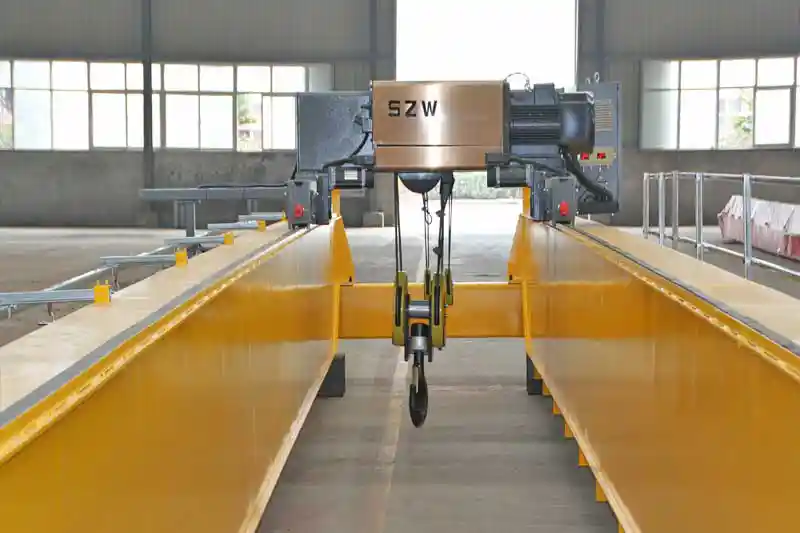
double girder overhead crane for sale
The Problem with Complex Crane Controls
Cranes are powerful machines. A small misstep can have big consequences—damaged materials, downtime, or even injuries. When the controls are not intuitive, operators are forced to think too much about the buttons instead of the load. That extra mental load leads to mistakes.
Practical issues caused by complex controls:
- Confusing switch layouts or unclear labels.
- Multiple steps needed for simple functions like adjusting speed or lifting height.
- Difficulty in recognizing system warnings or alarms quickly.
How Intuitive Controls Help
User-friendly controls make a big difference. When the control system matches how an operator naturally moves and reacts, work becomes safer and more efficient. Operators can focus on positioning the load precisely, not second-guessing the controls. For buyers and facility managers, this translates into fewer accidents, reduced equipment wear, and smoother operations overall.
Benefits of intuitive controls:
- Operators learn faster and feel more confident on the job.
- Reduced errors lead to safer work environments.
- Less equipment damage and downtime mean lower operational costs.
- Clear, simple systems make training easier and more consistent.
Understanding Operator Challenges
Starting on a crane for the first time can be stressful. Even someone with mechanical experience may hesitate when handling heavy loads suspended in the air. The fear of making a mistake—like hitting a beam, swinging a load too far, or dropping something—can make new operators anxious. This anxiety isn't just about nerves; it directly affects performance. Hesitation or over-caution can slow operations, while sudden panic movements can cause accidents.
Practical signs of operator anxiety:
- Hesitating before every movement or lift.
- Overcompensating with the controls, leading to jerky or uneven motions.
- Avoiding certain functions or complex maneuvers altogether.
Many facilities provide only basic or rushed training. While operators may learn the theory, hands-on experience is often limited. Without proper practice, even simple controls can feel confusing. When operators are unsure how to respond to alarms, adjust speeds, or operate multiple functions at once, mistakes become more likely.
Common training gaps include:
- Insufficient time for practice with real loads.
- Lack of step-by-step guidance for multi-function controls.
- Minimal coverage of safety features or emergency responses.
Complex or unintuitive controls make it easy for operators to make mistakes—even experienced ones. These errors often lead to accidents, damage to equipment, and lost productivity.
Typical errors include:
- Incorrect load positioning: Loads are placed off-center, causing instability or blocking workflow.
- Swaying or collisions: Overcorrection or delayed reactions can make the load swing, hitting walls, beams, or other equipment.
- Overloading or misuse of safety limits: Misreading control feedback or ignoring warning indicators can exceed crane limits, risking equipment damage or accidents.
Features of User-Friendly Crane Controls
A control panel should make sense the moment you see it. When buttons, levers, and toggles are arranged logically, operators don't have to pause to think about which control does what. This reduces hesitation and mistakes, especially for new staff or temporary operators. A well-designed layout also speeds up training and improves confidence on the floor.
Practical points for intuitive layouts:
- Group related functions together, like hoisting and trolley movement.
- Use clear labeling and color coding for quick identification.
- Ensure controls follow a consistent pattern across different crane models.
Operators need immediate feedback for every action. Whether it's a light, a beep, or a gentle vibration, feedback lets them know the crane is responding correctly. Without it, mistakes are easy—especially when handling heavy or awkward loads.
Examples of effective feedback:
- Visual indicators for load weight, trolley position, and limit switches.
- Auditory alarms for collisions, overloads, or emergency stops.
- Haptic feedback on joysticks for precise control adjustments.
Not every operator moves at the same pace, and not every load behaves the same way. Controls that allow adjustable speed and sensitivity let operators handle materials safely according to their comfort level. Slower, more precise movements reduce accidents and load sway, while faster movements can be used when experience and conditions allow.
Practical benefits:
- Reduces risk of collisions in tight spaces.
- Gives new operators more control as they learn.
- Improves efficiency once operators are confident.
Safety features built directly into the controls prevent errors before they happen. Emergency stops, anti-collision sensors, and overload protection are essential, and operators respond better when these systems are easy to access and understand.
Key safety functions to consider:
- Emergency stop buttons within reach at all times.
- Sensors to detect nearby obstacles or crane proximity.
- Automatic overload alarms and limit switches to prevent unsafe lifting.
Sometimes, standing on the crane or at a fixed console isn't the best way to see the load or the work area. Remote or wireless control systems allow operators to move freely, giving better visibility and ergonomics. This reduces stress, improves accuracy, and lowers the chance of accidents caused by poor sightlines.
Benefits of remote controls:
- Operators can position themselves for the clearest view of the load.
- Reduces fatigue from awkward or prolonged crane operation.
- Makes training easier—new operators can control the crane safely under supervision.
Benefits of User-Friendly Controls
When crane controls are straightforward and predictable, operators make fewer mistakes. They don't have to second-guess which lever does what or worry about complex button sequences. This leads to smoother, safer operations and fewer incidents on the shop floor.
Practical impact of reduced errors:
- Loads are positioned accurately the first time.
- Fewer collisions or swings that could damage materials or structures.
- Operators feel more confident and less stressed.
New operators pick up intuitive controls much more quickly. Instead of spending weeks learning a complicated system, they can focus on practicing safe handling and precision movement. This reduces onboarding time and helps facilities maintain productivity.
How user-friendly controls speed up training:
- Logical control layouts and clear labels reduce confusion.
- Visual and auditory feedback reinforces correct actions.
- Operators can focus on skill-building instead of remembering complex procedures.
Fewer mistakes directly translate into safer workplaces. When controls are easy to understand, operators are less likely to overload, misposition, or collide with objects. Safety features integrated into intuitive controls further reduce risks.
Examples of safety improvements:
- Emergency stops and limit switches prevent accidents before they happen.
- Anti-collision sensors help operators avoid unintended contact with structures or other equipment.
- Reduced load sway lowers the risk of injury or material damage.
Operators who feel confident and in control can work faster without sacrificing safety. Clear, simple controls allow them to focus on the task rather than struggling with the equipment.
Ways productivity improves:
- More efficient load positioning and material handling.
- Reduced downtime due to fewer mistakes or incidents.
- Operators spend less time double-checking actions or correcting errors.
Fewer operator mistakes mean less wear and tear on the crane. Properly handled equipment lasts longer, and costly repairs due to collisions or overloads are minimized.
Maintenance benefits:
- Longer service life for hoists, trolleys, and motors.
- Reduced frequency of unscheduled repairs.
- Overall lower operational costs for the facility.
Buyer Tips for Ensuring Safe and Intuitive Controls
Before committing to a crane purchase, it's crucial to see the controls in action. A demonstration helps you understand how intuitive the system really is. Watching operators handle loads with the controls gives a clear picture of learning curves, potential mistakes, and overall usability.
Tips for demonstrations:
- Test all key functions: hoisting, trolley movement, rotation, and speed adjustments.
- Observe both experienced and new operators using the controls.
- Ask questions about how quickly operators can respond to safety alerts.
Even the most user-friendly controls require proper training. Make sure your supplier provides comprehensive training solutions, including manuals, videos, and on-site sessions. This ensures your operators can handle the crane safely and efficiently from day one.
Practical training considerations:
- Step-by-step manuals with clear illustrations.
- Video tutorials showing common operations and safety practices.
- Hands-on, supervised training for real-world scenarios.
Controls should match how operators naturally move and interact. Poor ergonomics can lead to fatigue, mistakes, and slower operation. Consider joystick placement, button height, and overall accessibility when evaluating a crane.
Key ergonomic points:
- Ensure all controls are within easy reach.
- Avoid positions that force awkward wrist or arm movements.
- Consider adjustable consoles or seating for different operators.
User-friendly controls are only effective if they remain reliable. Ask about maintenance support and whether diagnostics are easy to understand. Systems that clearly indicate issues allow operators and technicians to act quickly before problems escalate.
Maintenance-friendly features:
- Simple error codes or messages that are easy to interpret.
- Accessible components for quick repairs or adjustments.
- Guidance from suppliers for routine checks and preventive maintenance.
Every facility has unique requirements. A crane that allows you to customize control layouts, speed settings, or safety features ensures the system fits your workflow and operator needs. This flexibility improves safety and efficiency.
Practical customization tips:
- Tailor button or joystick placement to match operator preferences.
- Adjust speed, sensitivity, or response curves for different load types.
- Incorporate additional safety features specific to your facility layout.
Case Studies
How One Facility Cut Accidents with Smarter Controls
At a metal fabrication plant in the Midwest, management noticed a worrying trend: new operators seemed tense, mistakes were happening, and minor accidents were becoming too frequent. The older crane controls were complicated, with confusing buttons and multi-step functions that made even routine lifts stressful.
When the facility upgraded to cranes with user-friendly controls—intuitive layouts, clear visual and audio feedback, and adjustable speed settings—the change was immediate. Operators felt more confident. The number of minor accidents dropped dramatically, and everyone noticed the workflow was smoother.
What improved:
- Operator confidence grew, reducing hesitation.
- Minor collisions and load mishandling fell by almost 60% in six months.
- Training new operators took half the time it used to.
Comparing Old and New Control Systems
In another case, a steel processing plant tracked operator errors across older and newer cranes. The older cranes required complicated sequences for simple moves. Hesitation and mistakes were common. With new, intuitive controls, including ergonomic joysticks, clear feedback signals, and built-in safety alerts, results were striking.
Error rate comparison:
- Incorrect load positioning: dropped from 15 incidents per month to just 4.
- Load sway and collisions: reduced by more than half.
- Operator stress: noticeably lower, improving overall efficiency.
Conclusion
Simplifying Operations and Reducing Errors
User-friendly crane controls make a real difference on the shop floor. When operators can focus on the task instead of second-guessing buttons or levers, mistakes drop, workflows improve, and safety increases. Simple, intuitive controls don’t just make life easier—they help prevent accidents that can disrupt operations and damage equipment.
- Intuitive layouts and clear feedback reduce operator errors.
- Adjustable speeds and ergonomic design help operators work safely and comfortably.
- Integrated safety features provide an extra layer of protection.
Protecting People, Equipment, and Costs
Investing in easy-to-use controls is an investment in your team and your facility. Safer operations mean fewer injuries, less equipment damage, and lower maintenance costs. Operators feel more confident, training time decreases, and overall productivity improves.
- Protects the people handling heavy loads.
- Reduces equipment wear and repair costs.
- Supports long-term operational efficiency.
When choosing a crane, don’t focus only on lifting capacity or price. Consider how intuitive the controls are, what training support is offered, and which safety features are included. These factors will directly impact day-to-day operations, employee confidence, and long-term costs.
Practical steps for buyers:
- Test control layouts before purchasing.
- Ensure operator manuals, videos, and on-site training are provided.
- Check for ergonomic design and easy-to-understand safety systems.
- Ask about customization options for your facility’s specific needs.